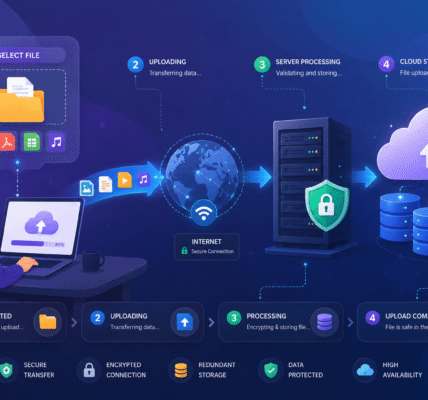

Large files are becoming increasingly common. High-resolution photos, 4K videos, design projects, software packages, and business documents can easily reach hundreds of megabytes or even several gigabytes in size.
Unfortunately, many platforms automatically compress uploaded files to save storage space and bandwidth. While compression can reduce file sizes, it often comes at the cost of image quality, video clarity, or data integrity. If preserving the original file quality is important, understanding how to upload large files without compression loss is essential.
This guide explains why compression happens, how to avoid it, and the best ways to transfer large files while keeping every byte intact.
Why Some Uploads Lose Quality
Not all upload systems store files exactly as they were uploaded.
Many social media platforms, messaging apps, and image-sharing services automatically compress files after upload. Their goal is to reduce storage requirements and speed up downloads for users.
Common examples include:
- Photos being resized automatically
- Videos being re-encoded at lower bitrates
- Images converted into different formats
- Metadata being removed
- Audio quality being reduced
While these changes may not be obvious at first glance, they can significantly affect professional work, archival content, and original media files.
If maintaining original quality matters, you need a platform that supports lossless file storage.
Choose Services That Preserve Original Files
The easiest way to avoid compression loss is to use platforms that store files in their original format.
Unlike many social media platforms, dedicated file upload and cloud storage services often preserve files exactly as uploaded.
Features to look for include:
- Original file retention
- No automatic image resizing
- No video re-encoding
- Support for large file sizes
- Direct file downloads
Before uploading, review the service documentation to verify whether files are stored without modification.
A reliable file-sharing platform should clearly state whether uploaded files are altered during processing.
Use Cloud Storage Instead of Social Platforms
Many users mistakenly upload important files through platforms designed for content sharing rather than file storage.
Social platforms prioritize fast viewing experiences and often compress content aggressively. Cloud storage platforms typically focus on preserving original files.
Cloud-based upload services offer several advantages:
- Original quality preservation
- Better support for large files
- Easier file sharing
- Version history
- Cross-device access
If the goal is file transfer rather than public content sharing, cloud storage is usually the safer option.
For photographers, videographers, designers, and businesses, cloud uploads are often the preferred solution for maintaining file integrity.
Upload Files Using Direct Transfer Methods
Direct uploads generally provide better quality preservation than platforms that process media extensively after upload.
Examples of direct transfer methods include:
- Dedicated file upload platforms
- Cloud storage uploads
- FTP and SFTP transfers
- Secure business file-sharing systems
These methods typically move files from your device to storage without altering the contents.
FTP and SFTP are particularly useful when transferring large project files, software packages, website backups, or media libraries because they focus on file transfer rather than content optimization.
When possible, avoid services that automatically generate compressed previews as the primary stored version.
Check File Size Limits Before Uploading
Large uploads sometimes fail because they exceed platform limitations.
Users often attempt to compress files unnecessarily simply because they assume size restrictions exist.
Instead, verify:
- Maximum file size limits
- Storage quotas
- Upload bandwidth restrictions
- Account-specific limitations
Many modern file upload services support files ranging from several gigabytes to multiple terabytes.
Knowing the actual limits helps you avoid unnecessary compression that could reduce quality.
If a platform supports chunked uploads, large files can be transferred in smaller pieces while preserving the original content.
Use Reliable Internet Connections for Large Uploads
Large files require more time to transfer successfully.
An unstable connection can interrupt uploads and increase the risk of failed transfers. Repeated upload failures may tempt users to reduce file size unnecessarily.
To improve upload reliability:
- Use wired internet when possible.
- Stay close to your Wi-Fi router.
- Pause heavy downloads during uploads.
- Avoid switching networks mid-transfer.
- Upload during periods of lower network congestion.
Many modern upload platforms also support resumable uploads, allowing transfers to continue after interruptions rather than restarting from the beginning.
This feature is especially valuable when transferring large media files.
Verify File Integrity After Upload
Uploading without compression loss is only half the process. It’s also important to confirm that the uploaded file matches the original.
A simple verification process can include:
- Comparing file sizes
- Reviewing image dimensions
- Checking video resolution
- Confirming metadata remains intact
- Downloading and inspecting the uploaded file
For business and technical environments, checksum verification is often used to ensure that uploaded and downloaded files are identical.
This extra step provides confidence that no modifications occurred during transfer or storage.
Best Practices for Preserving File Quality
Follow these recommendations whenever uploading large files:
- Upload original files whenever possible.
- Use services that promise lossless storage.
- Avoid social platforms for archival content.
- Verify upload limits before transferring files.
- Use secure, stable internet connections.
- Enable resumable uploads when available.
- Confirm file integrity after upload.
- Keep backup copies of important files.
These practices reduce the chances of quality loss and help maintain the original value of your content.
Conclusion
Uploading large files without compression loss is easier than many people realize. The key is choosing the right upload method and avoiding platforms that automatically modify files after transfer.
By using cloud storage services, direct upload systems, or secure file transfer methods, you can preserve original image quality, video resolution, metadata, and document integrity. Whether you’re sharing professional media, business assets, or personal archives, understanding how to avoid compression loss ensures your files remain exactly as intended from upload to download.